Product Catalog (PCAT)
Line Information DataBase (LIDB) - V11.0

Product Description
Line Information DataBase (LIDB) is a transaction-oriented database system that stores telephone line numbers and special billing number data used by Query Originators to process and bill Alternately Billed Services (ABS) calls. The Query Originators access LIDB data to provide originating line (calling number), billing number and terminating line (called number) information. Query Originators include:
- Operator Service Providers
- HUB Providers
- Billing Aggregators
- AIN Platform Applications
- End Offices
LIDB is used for calling card validation, fraud prevention, billing or service restrictions and the sub-account information to be included on the call's billing record.
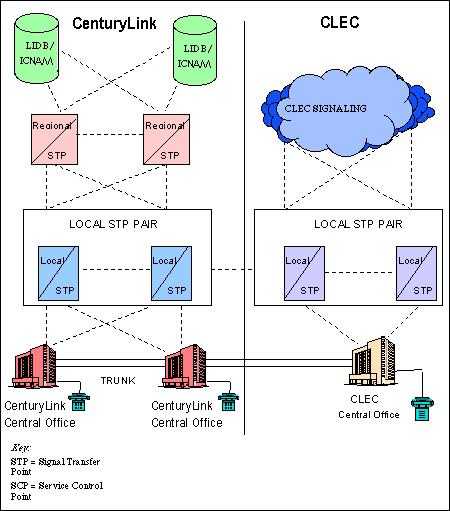
LIDB is a component of CenturyLink™'s Common Channel Signaling (CCS) Signaling System 7 (SS7) network. Access to CenturyLink's LIDB is provided through CenturyLink's Common Channel Signaling Access Capability (CCSAC) via a CCS Link. You may obtain your connection to the CenturyLink CCSAC either directly through your own SS7 network, or you may contract with a third party, or Hub Provider, to interconnect with the CenturyLink SS7 network. Click here for more information on CenturyLink's Common Channel Signaling Access Capability/Signaling System 7 (CCSAC/SS7) network.
Internetwork Calling Name (ICNAM) is a service that works in the same manner as LIDB. With ICNAM, rather than returning calling card or bill name validation data, the query data returned is the name of the calling party. Click here for more information on ICNAM.
LIDB services provide data storage and administration and query access to the data. Data storage and administration allows you to store and administer your own data in the CenturyLink LIDB. LIDB query access service provides information to service platforms as a result of SS7 query/response transaction processing.
You can choose to store and administer your data in the CenturyLink LIDB and/or request CenturyLink LIDB Query Service. You do not need to store your information in CenturyLink's LIDB in order to query data in the database.
There are three separate services associated with LIDB and this Product Description section provides information about each of these services:
- Line Information Database (LIDB) Data Storage
- Line Validation Administration System (LVAS) Access
- LIDB Query Service.
Line Information Database (LIDB) Data Storage
LIDB Data Storage allows you the ability to store your own data in CenturyLink LIDB. LIDB stores various telephone line numbers and Special Billing Number (SBN) data used by Query Originators to process and bill Alternately Billed Services (ABS) calls. A Special Billing Number is a record based on an NPA-0/1XX-XXXX numbering format, as opposed to the telephone number. ABS requests utilize the data stored to bill calls to accounts that may not be associated with the originating telephone number. The line record stored in LIDB contains information as follows:
- Calling Card
- Special Billing Number
- Originating Line Number Screening Data
- Third Number Acceptance Indicators
- Collect Acceptance Indicators
- Service and Equipment
- Class of Service
- Calling Name
- Account Owner
- Regional Accounting Office (RAO)
CenturyLink applies a service provider identifier to each end-user line record in LIDB. This identifier will designate the owner of each line record to ensure the records of one provider are not shared with another provider. LIDB database management is considered a "safe harbor" in CenturyLink. Access to LIDB is limited to a specific group of CenturyLink employees responsible for managing the database. By providing only restricted access to the databases, CenturyLink ensures that the privacy of end-user records is maintained.
You are responsible to provide your initial data and subsequent changes to the LIDB administrative system and to provide complete and accurate data to LIDB.
If you purchase Resale or commercial local exchange services, e.g. CenturyLink Local Service Platform™ (CLSP™) from CenturyLink, LIDB Data Storage is part of the offering. If you are a facility-based CLEC and would like CenturyLink to provide LIDB Data Storage on your behalf, rates are available in CenturyLink Operating Companies Tariff F.C.C. No. 11 Tariffs/Catalogs/ Price Lists.
Line Validation Administration System (LVAS)
Line Validation Administration System (LVAS) access is only available to facility-based CLECs. LVAS is the system that is used to change, add and delete records in LIDB. If you subscribe to LIDB Data Storage, and you have your line information stored in CenturyLink LIDB, LVAS is the system that is used to update your line records. LVAS audits stored information and assures accurate responses. You must have LIDB Data Storage to gain access to Line Validation Administration System (LVAS).
You can update LVAS in four ways:
- Via facsimile
- Via creation of an ASCII file of your transactions and then e-mailing that file to CenturyLink. The e-mail address will be provided by your CenturyLink Service Manager.
- File Transfer Protocol (ftp) a file to CenturyLink via the Internet
- Via a web interface NOTE: The setup of this web interface is required no matter which update mechanism is chosen for ongoing updates.
All update mechanisms require setup assistance from your CenturyLink Service Manager depending on which process is chosen.
LIDB Query Service
LIDB Query Service provides information to Query Originators for use in processing Alternately Billed Services (ABS) calls. If you use another company's service platform, (e.g., you purchase operator services from a third party, or you provide service only through resale or unbundled local switching arrangements), you do not need to arrange for LIDB Query Service. Query Originators are the only companies that request CenturyLink's LIDB Query Service.
The Query Originator obtains end-user line information stored in the CenturyLink LIDB when it launches a LIDB ABS query to the CenturyLink LIDB on a specific telephone number stored in the CenturyLink LIDB. The Query Originator launches the query through CenturyLink's SS7 signaling network. The CenturyLink LIDB sends a response containing the requested information on the specified telephone number over the signaling network.
Validation queries are designed to support ABS requests. Originating Line Number Screening (OLNS) queries are designed to support operator services and other service platforms that need call processing, billing, and service handling information.
Product Diagram
CLEC Signaling Network Interconnection
Line Information DataBase (LIDB)
Availability
LIDB Services are available in all of CenturyLink QC.
Technical Publications
All LIDB queries and responses are transmitted over the CCS/SS7 network using a Signaling System 7 protocol (refer to Telcordia, previously Bell Communications Research, TR-NWT-000246, Bell Communications Research Specification of Signaling System 7). The application data needed for processing LIDB data are formatted as Transaction Capabilities Application Part (TCAP) messages. TCAP messages may be carried as an application level protocol using SS7 protocols for basic message transport.
The Service Control Point node provides all protocol and interface support. CLEC SS7 connections will be required to meet Telcordia's GR905, TR954 and CenturyLink's Technical Publication 77342 specifications.
Pricing
Rates
Rates are available in CenturyLink Operating Companies Tariff F.C.C. No. 11 Tariffs/Catalogs/ Price Lists.
LIDB Query Service
The charges for LIDB Query Service are billed to the LIDB Query Originator. LIDB Query Service is billed on a per query basis at the rate specified in CenturyLink Operating Companies Tariff F.C.C. No. 11.
Tariffs, Regulations and Policy
Click here for Tariff information.
Features/Benefits
| Features | Benefits |
| LIDB Data Storage Storage of end-user line records |
Line records can be stored in Quest LIDB so a Query Originator can access your records |
| LIDB Data Storage Retrieval of end-user line record by Query Originator |
End-user can accept or deny collect or bill to third party toll calls. End-user can restrict use of Calling Card by having their Personal Identification Number (PIN) stored in LIDB |
| LIDB Data Storage Retrieval of end-user line record by called party's end office switch |
End-user can be assured that their name will be displayed on the called party's Caller ID unit |
| LVAS Multiple convenient methods to update your data |
Allows you to modify the line information per individual end-user based on service order activity by e-mailing those changes to CenturyLink for entry into the LVAS administrative system. Changes will be made within one business day. |
Applications
Please contact your CenturyLink Sales Executive for information.
Implementation
Product Prerequisites
If you are a new CLEC and are ready to enter the Interconnection business with CenturyLink, please view the Getting Started for Facility-Based CLECs or the Getting Started for Resellers web pages.
Pre-Ordering
Contact your CenturyLink Service Manager and request the LIDB Checklist of Required Information Form and the CLEC Contact Form.
The CenturyLink Service Manager will furnish you with the Checklist of Required Information Form and the CLEC Contact Form. Once these forms are completed, they should be sent to your CenturyLink Service Manager. The forms you submit for LIDB must be received at least 45 days prior to the service effective date. This time frame is necessary due to industry notification and testing requirements.
You must have a connection established to the CenturyLink Common Channel Signaling Network prior to activating LIDB services. If you are a LIDB Query Originator or participate in LIDB storage, the translations necessary to access the LIDB database are communicated via the "Link Data Sheet form. For additional information refer to the CCSAC/SS7 web site.
Ordering
Once the forms are received, your CenturyLink Service Manager will schedule a meeting with you to discuss the forms and negotiate a Due Date (DD).
LIDB Data Storage
If you purchase Resale or UNE-P services from CenturyLink, you do not need to order LIDB Data Storage. LIDB Data Storage is included with the service offering being resold, and CenturyLink will populate your LIDB information as it would for CenturyLink end-users. Subsequent changes to Resale or UNE-P records are updated via the Local Service Request (LSR) process.
LVAS
There is no ordering activity needed for Access to LVAS. You will be given a copy of the CenturyLink LIDB Data Storage Process by your CenturyLink Service Manager. This document details the structure of the data elements that need to be updated with CenturyLink, as well as emergency fax forms, contact lists and Fraud Event Notification forms. These forms may also notify CenturyLink of changes to contact information and changes to company data.
For additional information on LVAS update options, refer to the Product Description section of this document.
CenturyLink has emergency update procedures if you have access to the CenturyLink administrative system. When the administrative system (LVAS) is unavailable or unable to communicate with LIDB then these emergency update procedures go into effect. If you don't have access, you can fax your emergency requests to CenturyLink.
As a Reseller of CenturyLink services or UNE-P provider, your access to the LIDB Database is through the LSR process.
LIDB Query Services
The LIDB Query Originator orders LIDB Query Service. LIDB Query Service is requested via your Query Originator to the CenturyLink Service Manager. The CenturyLink Service Manager will obtain all necessary information to provision and bill LIDB Query Services.
LIDB Hub Providers
Hub Providers requesting LIDB services on your behalf, must furnish CenturyLink a Letter of Authorization (LOA) to provide these services. The LOA must be on file prior to provisioning the service.
Provisioning and Installation
To better understand how LIBD Provisioning is performed, download the LIDB Provisioning document.
LIDB Data Storage
Once LIDB Data Storage service has been requested, you will need to furnish CenturyLink with files containing all of the initial line records you want stored in CenturyLink LIDB.
LVAS
Using Line Validation Administration System (LVAS), CenturyLink will load your line records into CenturyLink LIDB or you can administer your line records via the methods listed above. You must provide the line record updates in accordance with the terms identified in your Interconnection Agreement.
The information needed to provision LIDB Services includes:
- The LIDB service requested (e.g., Calling Name, Originating Line Number Screening (OLNS), ABS)
- Your Revenue Accounting Office (RAO), Operating Customer Numbers (OCNs), and/or Local Service Provider Identification (LSPI)
- The NPA NXXs and signaling point codes for the operator or End Office Switches from which queries are launched
- The identify of your SS7 provider for Number Portability, ABS, OLNS and calling name
- The identity of your operator services provider for ABS queries
- Your contact names and fax numbers of your personnel to be contacted for fraud notification and LIDB data administration
CenturyLink will update the national routing guides to indicate your records are stored in CenturyLink LIDB. These routing guides include the LARG (LIDB Assignment Routing Guide) and the CNRG (Calling Name Routing Guide) and indicate that the line records for your Operating Company Number (OCN) are stored in the CenturyLink LIDB.
As previously discussed, you can provision data into LVAS in one of four ways. Using the ASCII file, you must format the ASCII file according to the requirements identified in the Service Account Mechanized Requirement Description document. This document is provided by your CenturyLink Service Manager at the Service Activation meeting. ASCII files may be e-mailed to CenturyLink at any time. CenturyLink will process your files a minimum of two times each business day. After the file is received at CenturyLink, an attempt will be made to load the data into LVAS. If the file is not successfully loaded into LVAS, CenturyLink will e-mail the error description and the file back to you. CenturyLink will return only the items in error and then load the remaining transactions from your file into the LVAS system. If, for some reason, the entire file is in error, then the entire file is sent back. The LVAS system will validate the change file and then transmit those changes to LIDB. All errors will be sent back to you for correction.
Fraud Alert Notification
The FraudView Fraud Management System (FMS) processes LIDB query detail records to establish patterns and identify potential fraudulent situations. FraudView issues an alert to the CenturyLink Fraud Investigation Unit (FIU). CenturyLink will notify you of any system alerts on your end-user lines.
At your direction, CenturyLink will institute a block to prevent any further occurrence of fraud or uncollectible toll charges, in accordance with the same practices used by CenturyLink for its own end-users. Fraud Alert Notification will be billed on a time and material basis per alert. As part of the planning process for LIDB Data Storage, you must provide CenturyLink with your contact for fraud notification. This contact must be available 24 hours a day, 7 days a week. CenturyLink will not take any action when fraud notification is received other than to notify you. You may request that CenturyLink deny a calling card. Any request of this type must be followed up with a fax to the CenturyLink Fraud Center as a confirmation. You will receive customized fraud forms after the Service Activation's meeting.
Network Impacts
SS7 network overload due to extraordinary volumes of queries and/or other SS7 network messages can have a detrimental effect on the performance of CenturyLink's SS7 network. CenturyLink, at its sole discretion, will employ certain automatic and/or manual overload controls in the CenturyLink SS7 network to safeguard against any detrimental effects. CenturyLink will report to you any instances where overload controls are invoked due to your SS7 network, and you agree in those cases to take immediate corrective actions as necessary to cure the conditions causing the overload situation.
CenturyLink may need to temporarily discontinue the LIDB Service if your TCAP errors are so excessive, as determined by CenturyLink, to jeopardize the viability of the LIDB Service.
Maintenance and Repair
Information is available in the Maintenance and Repair Overview.
For facilities-based CLECs needing maintenance or repair assistance, contact Validation Fraud Management Services (VFMS) at 480-829-4525, or via fax at 480-829-4649.
Billing
Charges for LIDB Query Services are billed out of CABS.
Billing for LIDB queries depend upon the arrangement you use to query the database. If you have your own query-originating platform, you will receive the billing. If you use a third party for query services, the third party will receive the billing based on their query access agreement.
Training
Local CenturyLink 101 "Doing Business With CenturyLink"
- This introductory web-based training course is designed to teach the Local CLEC and Local Reseller how to do business with CenturyLink. It will provide a general overview of products and services, CenturyLink billing and support systems, processes for submitting service requests, reports, and web resource access information. Click here for Course detail and registration information.
View additional CenturyLink courses in the Course Catalog.
Contacts
Service Manager
Validation Fraud Management Services (VFMS) at 480-829-4525, or via fax at 480-829-4649
General contact information is identified in the CLEC & Reseller Center Contacts web page.
Frequently Asked Questions (FAQs)
1. When I notice that some other carriers accept my billing
number and some do not, what should I do?
Contact the Validation Fraud Management Services (VFMS) support
line 480-829-4525 and have them verify the LIDB routing for those
carriers that do not accept your billing numbers.
2. What originating point code and sub-system number should
I enter in the LIDB and/or CNAM portion in my Number Portability
Administration Center (NPAC) record if the data is stored at CenturyLink?
You need to store the CenturyLink LIDB point code (e.g., 248-025-000)
in a Sub System Number of "0".
Last Update: January 30, 2017