Billing Information - Additional Outputs - SMDR, Completion Report, Loss Report - V24.0

Description
CenturyLink™ provides several additional output reports that you can either choose to receive or will receive. These output reports are, but not limited to, the following:
- Station Message Detail Recording (SMDR) - provides call details on calls that originate from a Centrex Plus Common Block.
- Completion Reports - received when a service order is completed or cancelled in the CenturyLink Service Order Processing (SOP) system and impacts you.
- Loss Reports - received when a service order with outward line activity is completed or cancelled and impacts you.
SMDR
This file is sent in addition to any Daily Usage File (DUF) you receive, if you are providing services to a end-user who has Centrex Plus. You must request this report. You will receive this report in EMI Format and call detail is provided on the following types of calls:
- Originating intra/inter Local Access and Transport Area (LATA) toll
- Outward Wide Area Telecommunications Service (WATS)
- VoiceGrade/Foreign Exchange Channels
- Directory Assistance (DA) Calls
The call detail could include the following:
- Date of Call
- Time of Call
- Call Duration
- Station Line from which Call Originated
- Called Number
- Selected Carrier
Loss and Completion Reports
Loss and Completion Reports are generated for the following products:
- Unbundled Loop
- Network Element Switching (Unbundled Switch)
- Resale
- Line Sharing
- CenturyLink Local Services Platform™ (CLSP™)
Loss and Completion reports are generated on a daily positive basis, whether there is data to report or not. This prevents any question as to whether or not a file was made available on succeeding days. Exceptions to this include service orders that do not meet required report edits. These orders are manually corrected so that they may subsequently appear on the reports.
The Loss and Completion reports can be transmitted in three different ways. The transmission method is chosen when completing the New Customer Questionnaire with your Service Manager. A technical review will be conducted after the questionnaire has been completed to discuss these options. The review is held with a representative of the IT-Wholesale Systems Implementation and Deployment Group (WS/I&D) who can assist you with any technical questions about the Loss and Completion Reports. A User Guide can be provided by the WS/I&D Client Representative.
The available transmission methods are:
NDM (dedicated circuit)
NDM (Network Data Mover) is a commercial product that is used to transport a data file from one point to another. Connect Direct (dedicated) NDM uses transport circuitry from a secure node at a CenturyLink site to a secure node at your site, with security built into the transport mechanism.
Receipt of the Loss and Completion Reports via NDM requires a dedicated circuit between your location and CenturyLink. The process for installing the circuit is handled by the WS/I&D Client Representative. Connect Direct software (can be purchased from Sterling Commerce - 800-311-9775; www.sterlingcommerce.com) is required to make this connection. Since this is a computer to computer transfer of information, an IP address that indicates the location of our NDM node, is provided to you. You provide your IP address to CenturyLink for gateway (firewall) access. A RACF Functional ID is also required and is provided to you by the WS/I&D Client Representative (takes about 4 days to establish).
FTPS Push (File Transfer Protocol Secure (FTPS) Explicit SSL (Secure Socket Layer) (Via Internet or dedicated circuit)
FTPS is an extension to the commonly used File Transfer Protocol (FTP) that adds support for the Transport Layer Security (TLS) and the Secure Sockets Layer (SSL) cryptographic protocols. In explicit mode (also known as FTPES), an FTPS client must "explicitly request" security from an FTPS server and then step up to a mutually agreed encryption method. If a client does not request security, the FTPS server can either allow the client to continue in unsecure mode or refuse/limit the connection.
NOTE: If a dedicated circuit is needed, the establishment takes from 30 to 45 days.
SSH/SFTP Push or pull (SSH File Transfer Protocol or Secure File Transfer Protocol, aka SFTP) via Internet
SSH/SFTP is a network protocol that provides file access and transfer over a network. It is an extension of the Secure Shell protocol (SSH) version 2.0. CenturyLink can push files with this protocol using SSH key authentication or password authentication. Files can be pulled from CenturyLink with this protocol with only password authentication. Files inbound to CenturyLink will need to be pushed as we will not pull them from your server.
The Loss and Completion reports are available in two formats:
- Flat File - This option gives you the Loss and Completion data in a report with headings and columns. It might be appropriate for large volumes of data that you can mechanically parse for use in your particular system.
- Report Layout - This option gives you the Loss and Completion data in a format that is similar to the ASCII format. It might be more useful for smaller volumes of data that will be handled manually.
Web Access
CenturyLink Protected Internet Delivery
NOTE: CPID (fka QPID) is scheduled to be decommissioned on November 20, 2018. CenturyLink offers other file sharing protocols in addition to those listed above. For Web-based access, please review Overview of Web Interface to CenturyLink B2B Gateway.
An Internet connection and browser is needed to access the CenturyLink Protected Internet Delivery (CPID) which provides a secure communications mechanism for applications and data transfer on internal and external networks. Most users will be connected to an internal network that has a point of presence (POP) to the Internet that provides for online speeds of T1 or better and they will be using a Windows 95/98/2000/NT machine with either Netscape or Internet Explorer. In order to receive the Loss and Completion Reports via the Web, you will need a VeriSign (digital) certificate which register's your PC and allows you access to the records. The digital certificate can be downloaded from the web at http://ecom.centurylink.com. The digital certificate, provided by CenturyLink, requires a User ID and Password. This ID and password will be assigned to you by the WS/I&D Client Representative.
The Web User Guide, which details the procedures for obtaining the digital certificate and for accessing the usage report on the web, will be sent to you by the WS/I&D Client Representative.
CenturyLink B2B Gateway Web Interface
An Internet connection and browser is needed to access the CenturyLink B2B Gateway web interface which provides a secure communications mechanism for data transfer. Access will be provided by CenturyLink which requires a User ID and Password. This ID and password will be assigned to you by the WS/I&D Client Representative.
For Web-based access, please review Overview of Web Interface to CenturyLink B2B Gateway.
The Loss and Completion reports are available in two formats:
- Flat File - This option gives you the Loss and Completion data in a report with headings and columns. It might be appropriate for large volumes of data that you can mechanically parse for use in your particular system.
- Report Layout - This option gives you the Loss and Completion data in a format that is similar to the ASCII format. It might be more useful for smaller volumes of data that will be handled manually.
Fax
Receipt of the Loss and Completion reports by fax requires that you provide your fax number to CenturyLink. The reports are only provided in the Report Layout format which appears with columns and headings.
- If you receive your report via the web, you will be able to access your report after initial distribution. Reports will be retained on the web for access and downloading for 30 days from the date the report is posted. However, once the Loss or Completion data has been retrieved, it cannot be downloaded again. In order to have the data retransmitted, a request must be made by calling the IT-Wholesale Systems Help Desk at 1-888-796-9102.
- If multiple reports are selected via fax, they will be concatenated and sent as one fax.
Completion Report
The Completion Report is sent to you when a service order is completed or cancelled in the Service Order Processing (SOP) system, impacting you. The order has been provisioned, but has not necessarily posted to the billing system. The Completion Report is generated for all order types that carry your identifying RSID and ZCID.
Note 1: Cancelled orders are distinguished by a CAN, CANC or CANP suffix to the service order number. For canceled orders in the Eastern region, the Completion Date field will reflect the current Due Date. In the Western and Central regions, the Completion Date field is populated with zeros. A cancelled order means that the provisioning work has been stopped and the order will never post to billing.
The completion date on the Completion Report is solely an informational notification which represents the date that the service order was completed. It may not reflect when the billing stopped. Dates will vary when an Effective Billing Date (EBD) is applied to the service order. EBD is used when the completion date is different than the effective billing date.
It is your responsibility to review your summary bill to determine the actual date CenturyLink stopped billing on a specific number.
Note 2: A Record Correction order may appear on the report. It will be identified with a RECCOR as the Purchase Order Number (PON). This is used to identify an order that was issued by CenturyLink to change information on the Customer Service Record. It can be a billing only order, or a provisioning order. It will depend on the situation. These types of orders take investigation to find why the order was issued.
Completion Reports are not available for LNP Services.
If you receive your report via the web, you will be able to access your report after initial distribution. Reports will be retained on the web for access and downloading for 30 days from the date the report is posted.
The record layout for the fixed file format of the Completion Report is as follows:
Proprietary Record |
Start Position |
Characters |
Description |
Proprietary Statement |
1 |
68 |
Statement - "This document is proprietary and confidential to the company named: " |
CLEC Name |
69 |
157 |
Translated RSID/ZCID to CLEC + |
Filler |
226 |
5 |
|
|
|
|
(Record Length = 230) |
Header Record |
Start Position |
Characters |
Description |
Header Indicator |
1 |
3 |
HDR=header record indicator |
Filler |
4 |
1 |
|
Product Type |
5 |
3 |
LSH, RSL, UBL, NES or CLS (CLSP) |
Origin |
8 |
6 |
".#CTL." |
RSID Code |
14 |
3 |
3-digit RSID Code |
Filler |
17 |
1 |
"." |
Completion/Loss Code |
18 |
5 |
"COMP " |
CLEC Name |
23 |
40 |
Name of CLEC translated from RSID Code |
Create Date |
63 |
8 |
mmddyyyy |
Create Time |
71 |
6 |
hhmmss |
Filler |
77 |
154 |
For Future Use |
|
|
|
(Record Length = 230) |
Detail Record |
Start Position |
Characters |
Description |
RSID |
1 |
3 |
CLECs RSID/ZCID code |
TN or CKT Id |
4 |
10 |
Telephone number or Circuit ID |
Cus Code |
14 |
3 |
Customer Code for account |
Filler |
17 |
1 |
|
Order Type |
18 |
1 |
Type of Order Completed |
Order Number |
19 |
8 |
Identifying order number |
Filler |
27 |
1 |
|
Order Suffix |
28 |
11 |
Order Suffix information |
Listed Name |
39 |
35 |
Name in LIST section of account |
Service Address |
74 |
35 |
Service address (list addr if not present) |
Location |
109 |
35 |
Service address location (if present) |
Completion Date |
144 |
8 |
mmddyyyy |
See Note 1 above |
|||
Filler |
152 |
1 |
|
Purchase Order Number |
153 |
30 |
· CLECs Purchase Order Number |
· Field will display "TIC" as the prefix on |
|||
· Field will display "RECCOR" as the PON for |
|||
· CenturyLink "Winback" orders will display |
|||
Working TN or CKT Id |
183 |
24 |
Working Telephone Number or Circuit ID |
Filler |
207 |
1 |
|
Working TN TER or DID |
208 |
4 |
TER of Working TN or Circuit ID DID of Working TN |
CMPTNCKT |
212 |
10 |
Billing Telno for Circuit format |
Filler |
222 |
1 |
|
CMPCC |
223 |
3 |
Cust Code associated to the Circuit BTN |
Filler |
226 |
5 |
|
|
|
|
(Record Length = 230) |
Trailer Record |
Start Position |
Characters |
Description |
Trailer Indicator |
1 |
3 |
TRL=Trailer Indicator |
Detail Record Count |
4 |
6 |
Total count of detail records |
RSID of File |
10 |
3 |
RSID/ZCID Code or ALL |
Filler |
13 |
218 |
|
|
|
|
(Record Length = 230) |
Proprietary Record |
(repeated) |
|
|
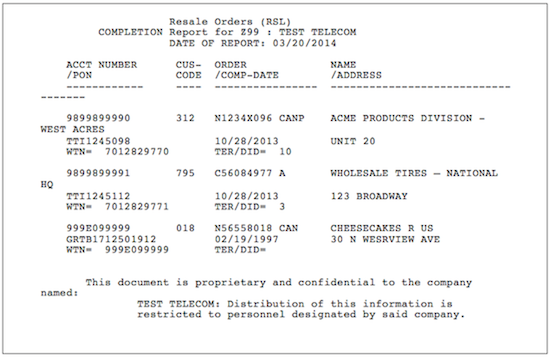
The following is an example of a Completion Report when there are completions to report:
The following is an example of a Completion Report when there are no completions to report:
Loss Report
The Loss Report indicates any change in your customer’s service that results in a loss to you (i.e., the customer changes service providers or disconnects a line). This information is included for each interconnect product that you provide. The file is sorted in NPA-telephone order.
The Loss Report is sent to you when a service order, that shows outward line activity, is completed or cancelled and impacts you. This can be accomplished on a D=Disconnect, C=Change or R=Record Order.
Note 1: Cancelled orders are distinguished by a CAN, CANC or CANP suffix to the service order number. For canceled orders in the Eastern region, the Completion Date field will reflect the current Due Date. In the Western and Central regions, the Completion Date field is populated with zeros. A cancelled order means that the provisioning work has been stopped and the order will never post to billing.
The completion date on the Loss Report is solely an informational notification which represents the date that the service order was completed. It may not reflect when the billing stopped. Dates will vary when an Effective Billing Date (EBD) is applied to the service order. EBD is used when the completion date is different than the effective billing date.
It is your responsibility to review your summary bill to determine the actual date CenturyLink stopped billing on a specific number.
Note 2: A Record Correction order may appear on the report. It will be identified with a RECCOR as the Purchase Order Number (PON). This is used to identify an order that was issued by CenturyLink to change information on the Customer Service Record. It can be a billing only order, or a provisioning order. It will depend on the situation. These types of orders take investigation to find why the order was issued.
Note 3: The report will exclude any activity requested by you. It will only be reporting a loss of a customer to another service provider that has not called you to disconnect their service. This does include possible losses as well since the report includes Cancelled Orders.
Loss Reports are not available for LNP Line Splitting and Loop Splitting Services.
If you receive your report via the web, you will be able to access your report after initial distribution. Reports will be retained on the web for access and downloading for 30 days from the date the report is posted.
To allow for you to identify lines lost to other providers, a loss type indicator is on the Loss Report. The indicator is as follows:
- E= External – identifies a line lost to another provider
The record layout for the fixed file format of the Loss Report is as follows:
Proprietary Record |
Start Position |
Characters |
Description |
Proprietary Statement |
1 |
68 |
Statement - "This document is proprietary and confidential to the company named: " |
CLEC Name |
69 |
157 |
Translated RSID/ZCID to CLEC + |
Filler |
226 |
5 |
|
|
|
|
(Record Length = 230) |
Header Record |
Start Position |
Characters |
Description |
Header Indicator |
1 |
3 |
HDR=header record indicator |
Filler |
4 |
1 |
|
Product Type |
5 |
3 |
LSH, RSL, UBL, NES or CLS (CLSP) |
Origin |
8 |
6 |
".#CTL." |
RSID Code |
14 |
3 |
3-digit RSID Code |
Filler |
17 |
1 |
"." |
Completion/Loss Code |
18 |
5 |
"LOSS " |
CLEC Name |
23 |
40 |
Name of CLEC translated from RSID Code |
Create Date |
63 |
8 |
mmddyyyy |
Create Time |
71 |
6 |
hhmmss |
Filler |
77 |
154 |
|
|
|
|
(Record Length = 230) |
Detail Record |
Start Position |
Characters |
Description |
RSID |
1 |
3 |
CLECs RSID/ZCID code |
TN or CKT Id |
4 |
10 |
Telephone number or Circuit ID |
Cus Code |
14 |
3 |
Customer Code for account |
External Indicator |
17 |
1 |
Loss Report only E=External Loss |
Order Type |
18 |
1 |
Type of Order Completed |
Order Number |
19 |
8 |
Identifying order number |
Filler |
27 |
1 |
|
Order Suffix |
28 |
11 |
Order Suffix information |
Listed Name |
39 |
35 |
Name in LIST section of account |
Service Address |
74 |
35 |
Service address(list addr if not present) |
Location |
109 |
35 |
Service address location (if present) |
Completion Date |
144 |
8 |
mmddyyyy (year 2000 format) |
See Note 1 above |
|||
Filler |
152 |
1 |
|
Purchase Order Number |
153 |
30 |
· CLEC's Purchase Order Number |
· Report will display "RECCOR" as the PON for |
|||
· CenturyLink "Winback" orders will display |
|||
Working TN or CKT Id |
183 |
24 |
Working Telephone Number or Circuit ID |
Filler |
207 |
1 |
|
Working TN TER or DID |
208 |
4 |
TER of Working TN or Circuit ID DID of Working TN |
CMPTNCKT |
212 |
10 |
Billing Telno for Circuit format |
Filler |
222 |
1 |
|
CMPCC |
223 |
3 |
Cust Code associated to the Circuit BTN |
Filler |
226 |
5 |
|
|
|
|
(Record Length = 230) |
Trailer Record |
Start Position |
Characters |
Description |
Trailer Indicator |
1 |
3 |
TRL=Trailer Indicator |
Detail Record Count |
4 |
6 |
Total count of detail records |
RSID of File |
10 |
3 |
RSID/ZCID Code or ALL * |
Filler |
13 |
218 |
|
|
|
|
(Record Length = 230) |
Proprietary Record |
(repeated) |
|
|
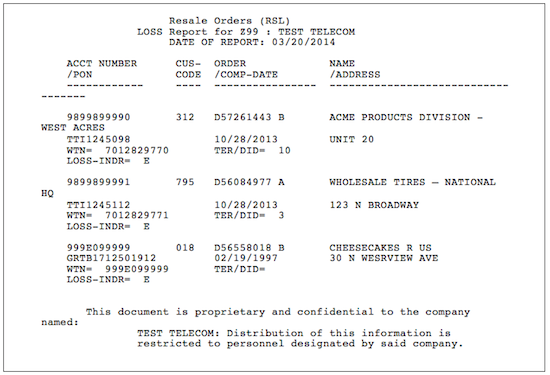
The following is an example of a Loss Report when there are losses to report:
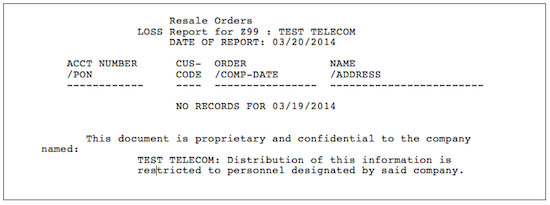
The following is an example of a Loss Report when there are no losses to report:
Implementation
Ordering
Completion Report/Loss Report
You must supply the following information on the New Customer Questionnaire to receive both the Completion Report and the Loss Report:
- Contact
- Name
- Telephone Number
- Mailing Name
- Street Address
- City, State, Zip
- E-mail Address
- Type(s) of Service(s)
- Resale
- Network Element Switching (Unbundled Switch)
- Unbundled Loop
- Line Sharing
- CLSP™
- Transfer Options
- Network Data Mover (NDM) (Dedicated Circuit)
- FTP/S (push)
- SFTP (push or pull)
- Web
- Fax
Training
Local CenturyLink 101 "Doing Business With CenturyLink"
- This introductory web-based training course is designed to teach the Local CLEC and Local Reseller how to do business with CenturyLink. It will provide a general overview of products and services, CenturyLink billing and support systems, processes for submitting service requests, reports, and web resource access information. Click here to learn more about this course and to register.
Click here for more detail and registration information.
View additional CenturyLink courses by clicking on Course Catalog.
Contacts
CenturyLink contact information is located in Wholesale Customer Contacts.
For additional information contact your CenturyLink Service Manager.
Frequently Asked Questions (FAQs)
1. What information does the Completion Report contain?
The Completion Report contains information when a service order is completed or cancelled at CenturyLink.
2. Does receipt of the Completion Report mean that the RSID should be displayed in the CSR?
A Completion Report means that the order has been provisioned. The CSR may not indicate an RSID for a short time after provisioning. After 21 days if the CSR still does not indicate a resold account, call the Interconnect Service Center and inquire about the status of the order.
3. What information does the Loss Report contain?
The Loss Report shows outward activity when a service order is completed or cancelled. The Loss Report will display indicators that allow you to distinguish lines lost to other providers from lines lost for other reasons.
Last Update: April 30, 2018
CenturyLink Local Services Platform™ (CLSP™) and CLSP™ are registered trademarks of CenturyLink.